After more than 1,000 hours working with AI agents – not chatbots, but autonomous systems that execute tasks independently – I’ve distilled 27 principles. They separate productive AI use from frustrating tool-fighting. These aren’t theoretical musings: they come from building over 50 skills and running a Personal AI Operating System every day.
The difference between a chatbot and an AI agent? A chatbot answers. An agent acts. It researches, writes code, publishes content, analyzes data – and learns from your feedback along the way. But only if you understand the rules of the game.
Here are the AI agent principles that made the biggest difference – grouped into five categories.
Mindset: How You Should Think About AI Agents
1. Expect mistakes – that’s where the learning begins
The biggest mistake I see with new AI users: they expect perfection on the first try. That’s like firing a new employee on day one because they didn’t get everything right immediately. AI agents are probabilistic systems. Mistakes aren’t a bug – they’re a feature that shows you where you need to sharpen your instructions.
2. Don’t stop at “it didn’t work” – ask why
When an agent makes a mistake, the temptation is to just try again. Better: ask the agent why it didn’t work. In 80% of cases, it can diagnose the cause itself. That diagnosis is more valuable than any successful result – because you derive a rule for the future from it.
3. Traditional software rewards reading the manual. AI rewards iteration.
With traditional software, you read the documentation, follow the steps, done. With AI agents, that doesn’t work. You have to iterate: start an attempt, evaluate the result, adjust the instructions, repeat. Those who iterate, win. Those who wait for the perfect prompt, lose.
4. 90% of AI problems can be solved by the AI itself – but you have to ask
This might be the most surprising principle. When an agent fails, copy the error message and feed it back. Say: “Analyze this error and suggest a fix.” Current models like Claude Code are remarkably good at debugging their own mistakes. You just have to learn to ask them.
Context: Why Your AI Is Only as Good as What You Give It
5. Your AI is only as good as the context you give it
Imagine asking an expert for help – but telling them neither who you are, what you do, nor what you want to achieve. That’s exactly what most people do with AI agents. Context isn’t optional. Context is the multiplier for quality.
6. Write instructions like onboarding for a new colleague – not like code
When you explain how something works to a new team member, you use natural language, give examples, and explain the why. That’s exactly how you should write instructions for AI agents. No pseudo-code, no cryptic abbreviations. Plain language with context.
7. Short prompts + rich context beat long prompts + no context
I constantly see people writing 500-word prompts – but giving the agent no access to relevant files, previous results, or style guidelines. Flip it: keep your prompt short (“Write a blog post about X”) and instead give the agent access to everything it needs – sample articles, brand guidelines, previous feedback.
8. Save your learnings – your AI should get better with every session
Every time you correct a mistake or achieve a better result, write down the insight. In my system, there’s a file that grows automatically: every correction becomes a rule that the agent considers in the next session. After 1,000 sessions, my agent has hundreds of such rules – and doesn’t make the same mistakes twice.
Building Systems: From Single Prompts to Scalable Workflows
9. Manual → Pattern → Skill: the three-phase progression
Everything starts manually. You do something a few times with the agent and notice a pattern emerging. Then you formalize it: you write down the steps, define inputs and outputs, add quality checks. The result is a “skill” – a reusable workflow that the agent can execute independently.
10. A skill with scripts is better than a skill with just instructions
Pure text instructions work – up to a point. But when you offload critical steps into deterministic scripts (e.g., a validation script that checks the output), the workflow becomes more reliable. The AI handles the creative part; the script takes care of quality assurance.
11. Don’t let the AI reinvent solutions it already has
AI agents tend to start from scratch with every task – unless you show them the way. If you already have a script that works, tell the agent: “Use this script.” Not: “Solve this problem.” The difference between 2 minutes and 20 minutes often comes down to a single sentence.
12. Hooks are your safety net – deterministic checks for probabilistic actions
The most important architectural principle: set up automatic checks that run after every AI action. Was the file actually created? Did the deployment succeed? Does the output match the schema? Hooks catch errors before they cause damage – like an editor who reads every email before it goes out.
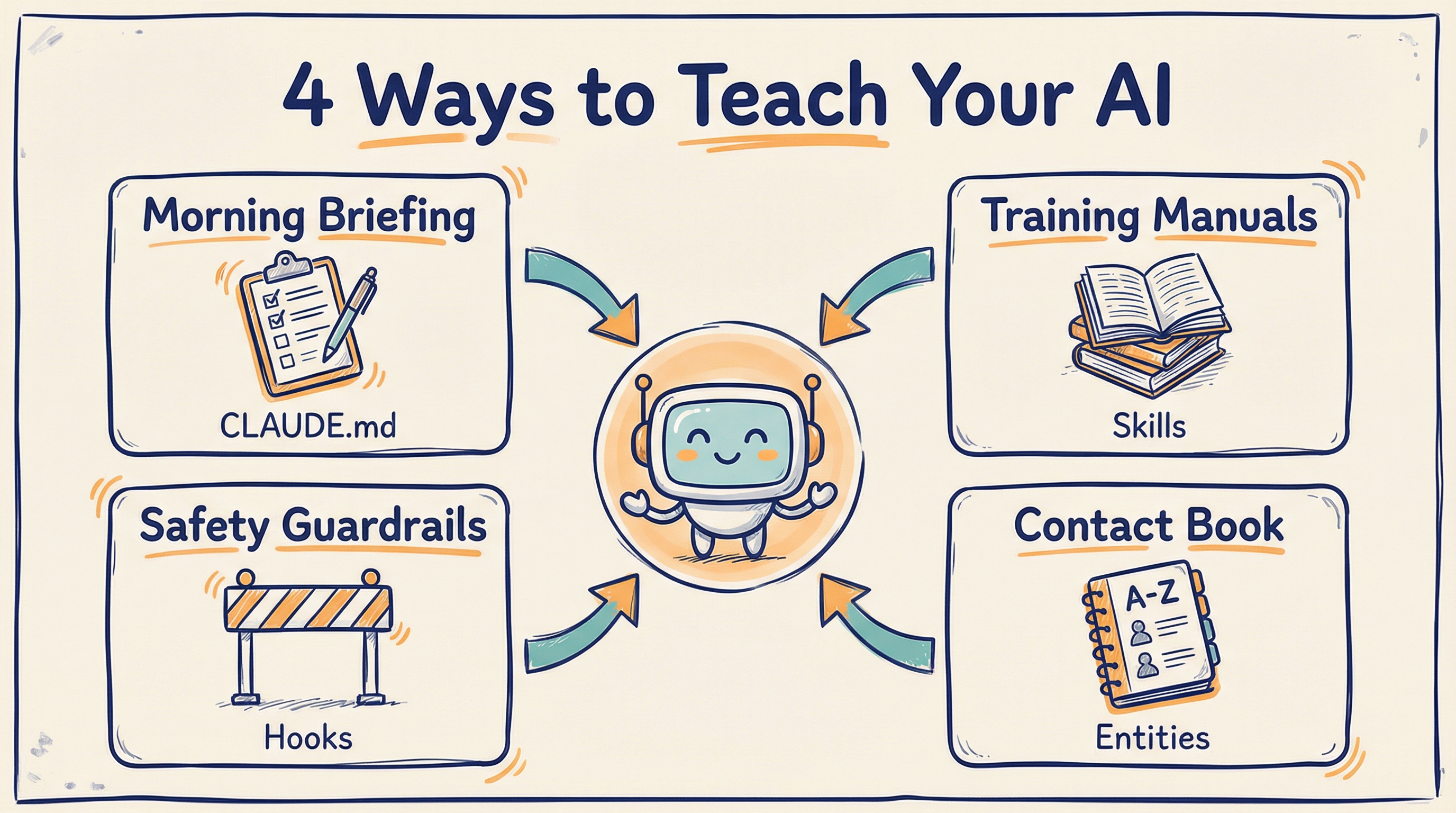
The four levels span short-term prompts to long-term skills — rule of thumb: anything you explain three times belongs in a file, not in chat.
Collaboration: How to Work with AI Agents as a Team
13. Share skills, not prompts – skills are reusable, prompts are one-off
When a colleague asks how you did something with AI, don’t send them the prompt. Send them the skill – the complete guide including context, quality checks, and sample outputs. A prompt is like a fish. A skill is the fishing rod.
14. If you can explain it to a colleague, you can teach it to the AI
This is the best litmus test: if you’re unable to explain what you want to a new colleague, the AI won’t understand it either. Conversely: if you could explain it to a person, you can translate it into an AI instruction. The ability to externalize knowledge is the most important competency in the AI age.
15. AI doesn’t replace thinking – it replaces typing
This point is often misunderstood. AI agents don’t make you smart. They make you fast. You still need to know what you want, why you want it, and what good quality looks like. The AI handles the execution – the strategy stays with you. A McKinsey study estimates that generative AI can accelerate knowledge-intensive work by 40-60% – but only for people who know what they’re doing.
Practical Habits: What Makes the Difference Every Day
16. Voice input is 3x faster than typing – use it
Most people type their prompts. I speak mine. With voice input, you can deliver more context in 30 seconds than in 3 minutes of typing. Especially for complex tasks where you need to explain background, goals, and constraints to the agent, voice input is a game-changer.
17. Start every day with a briefing, end with a reflection
Every morning I tell my agent: “What’s on the agenda today?” It pulls together my calendar, open tasks, and yesterday’s notes. In the evening, I have it summarize what was accomplished and what carries over to tomorrow. These two minutes create more structure than any project management tool.
18. Run multiple tasks in parallel – the AI can handle 4-5 things at once
While you’re waiting for a research result, the agent can simultaneously draft a document, analyze data, and prepare an email. Most people use AI sequentially – one task at a time. But the biggest productivity gain lies in parallelization.
19. Always review before anything leaves your machine
No matter how good your agent is: every email, every blog post, every analysis must go through your eyes before it’s published. Not because the AI is bad – but because you are responsible for it. AI agents are tools. The responsibility stays with you.
The Remaining Eight Principles – In Brief
Not all 27 principles need a detailed explanation. Some speak for themselves:
- 20. Version your instructions – What works today may not work tomorrow. Git for prompts is not overkill.
- 21. Separate creative from analytical tasks – An agent asked to write creatively and fact-check at the same time will do both mediocrely.
- 22. Use templates for recurring outputs – Define the structure once, then fill it again and again.
- 23. Set clear boundaries – Tell the agent explicitly what it should not do. “Don’t publish anything without my confirmation.”
- 24. Automate the boring, not the important – Data entry, formatting, research? AI. Strategic decisions? You.
- 25. Measure results, not activity – It’s not how many prompts you write that counts – it’s what comes out in the end.
- 26. Build in feedback loops – Have the agent evaluate its own output before presenting it to you.
- 27. Stay curious – Technology changes faster than any principle. What holds true today may be obsolete tomorrow. The only constant: your willingness to keep learning.
Frequently Asked Questions
What are the most important rules for working with AI?
The most important rules are: give your AI maximum context, work in files instead of chats, and treat AI agents like team members with clear tasks. Consistency in collaboration matters more than occasional brilliance.
How do I use AI agents productively in daily work?
Build reusable workflows as Markdown files that your agent executes on demand. Instead of starting from scratch every time, collect proven templates, checklists, and context files that your agent can draw from.
Do I need programming skills to work with AI agents?
No, you do not need programming skills. Most principles are based on clear communication, structured thinking, and maintaining good files. Programming knowledge is a bonus but not required to work productively with AI agents.
Conclusion: The Most Important Insight After 1,000 Hours
AI agents are neither a magic solution nor a toy. They are a new medium of collaboration between humans and machines. Those who treat them like a chatbot waste 90% of their potential. Those who treat them like an operating system – with structure, context, and continuous learning – build an unfair advantage.
The 27 AI agent principles can be reduced to a single question: Do you treat your AI like a tool – or like a teammate you’re onboarding?
If you want to go deeper, read my article From Chatbot to AI Operating System – where I describe the architecture behind these principles.
Sources & Further Reading
- Claude Code by Anthropic – the AI agent I work with every day
- McKinsey: The Economic Potential of Generative AI – 40-60% productivity boost for knowledge work
- Wikipedia: AI Agent – definition and distinction from traditional chatbots
- From Chatbot to AI Operating System – the architecture behind my Personal AI
Looking for an AI keynote speaker for your 2026 event?
Live Digital-Twin demos, neuroscience-grounded content, in English, German, or Dutch. Drop a line — we’ll confirm fit within 24 hours.
About the Author: Dr. Jonathan T. Mall is a cognitive neuropsychologist, CIO, and co-founder of neuroflash. He develops AI-powered systems for Predictive Audience Intelligence and regularly speaks about the intersection of psychology, AI, and productivity. Contact: jonathanmall.com · LinkedIn.