From Chatbot to AI Operating System 2026: How I Orchestrate My Entire Workflow with AI
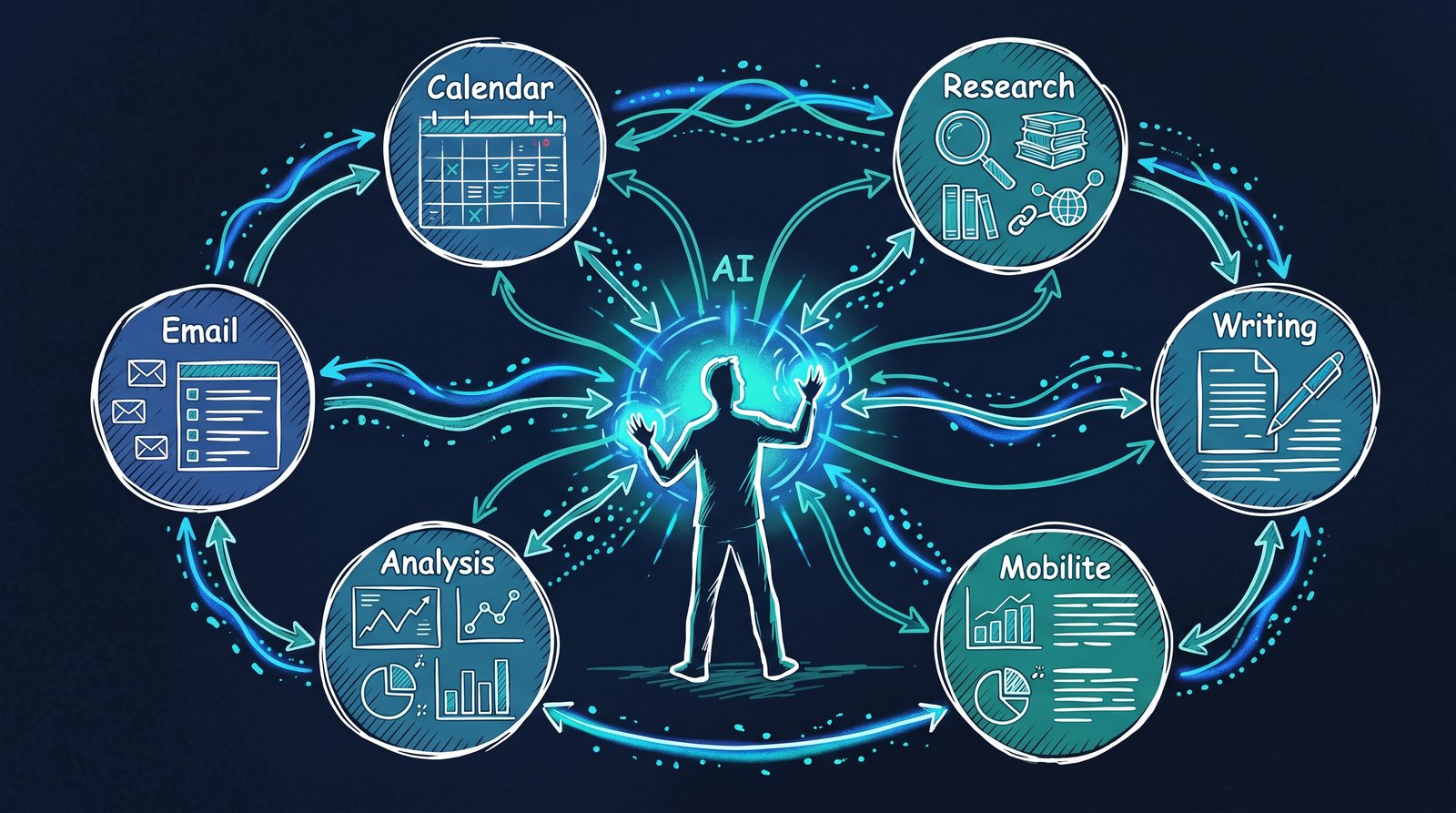
Running this at company scale? AI Operating System 2026: Complete Enterprise Guide covers governance, GDPR, and a 5-step enterprise rollout roadmap.
What are the three stages of AI, from chatbot to operating system?
Most people use AI like a chatbot: you type a question, you get an answer. One-shot. Maybe a short conversation, a few follow-ups, but at its core, everything stays in the chat window. The prompt gets long, context is lost, and tomorrow you start from scratch.
Over the past few months, I’ve built something different. Something I internally call PAI: a Personal AI Operating System. And the difference compared to a chatbot is roughly as big as the difference between a pocket calculator and an operating system.
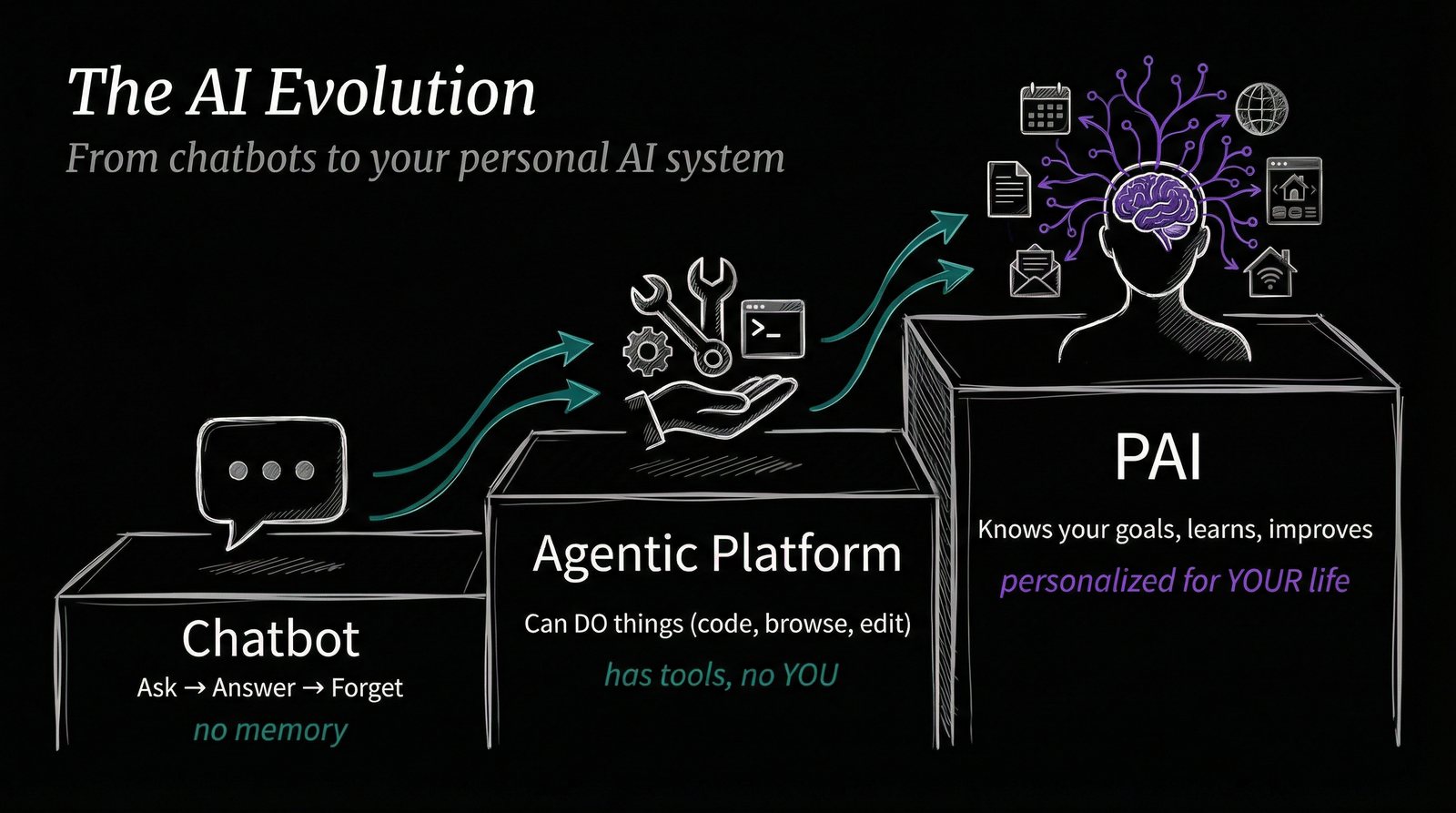
Each stage triples the operating radius: a chatbot answers questions, an agentic platform executes tasks, an AIOS orchestrates whole work systems.
There are three stages, and each one fundamentally changes how you work with AI:
Stage 1: The Chatbot
Imagine giving a cousin detailed instructions for the garden: “Red flowers on the right, yellow ones on the left, the seeds are in the car.” Everything has to fit into a single prompt. The context is massive, the result comes in one shot. That’s how most people work with ChatGPT today.
Stage 2: The Agent
Now you just say: “Build me a treehouse.” The AI knows where the tools are, understands structural requirements, and can send you an email when it’s done. That’s Tool Use. The AI has access to external systems and can independently solve multi-step tasks.
Stage 3: The AI Operating System
Here you just say: “Organize a treehouse party.” The AI already knows you have a treehouse (because it remembered), knows your friends (from the address book), creates invitation cards (with an image tool), and even knows which guests shouldn’t sit next to each other. The prompt gets shorter, the intelligence in the background grows.
What does an AI operating system actually change in daily work?
That sounds abstract, so let me show you what has actually changed in my daily work:
| Task | Before | With AIOS | Savings |
|---|---|---|---|
| Email triage (daily) | 60 min | 2 min | 97% |
| Deep research (per topic) | 8 hrs | 15 min | 97% |
| LinkedIn enrichment | 30 min | 2 min | 93% |
| Meeting analysis | 2 hrs | 2 min | 98% |
Across four task types AIOS workflows cut time by 93 to 98 percent. The leverage comes from eliminating manual research and triage steps, not from faster text generation.
Two rows make the pattern concrete: daily email triage drops from 60 minutes to 2 minutes with an AIOS, a 97% reduction, and deep research on a single topic drops from 8 hours to 15 minutes, also a 97% reduction.
Important to note: the email triage only creates drafts. I still decide what gets sent. The AI takes over the writing, not the thinking.
How is an AI operating system architected?
An AI Operating System isn’t simply “a better chatbot.” It consists of four management systems that work together:
Shao et al. (2023) formalized this idea in an arXiv paper titled “AIOS: LLM Agent Operating System,” proposing that an operating-system layer, not a longer prompt, is what lets an LLM agent schedule tools, manage memory, and run multiple tasks reliably.
- Instructions (CLAUDE.md). The manual for the AI. Who am I, how do I work, what rules apply? This is the context the AI always has, in every conversation.
- Skills: Reusable workflows. Instead of explaining how to write a blog article every time, there’s a skill for that. I currently have over 50 skills: from transcription to image generation to invoicing.
- Entities: Knowledge about people, companies, and contexts. When I say “write Oliver a follow-up email,” the AI already knows who Oliver is, which company he runs, and what we last talked about. The same logic, scaled to an entire market, is what powers digital twins in market research, simulated audiences you can query instead of waiting weeks for a live panel.
- Memory: What the AI has learned about working with me. Which mistakes it shouldn’t repeat, which approaches I prefer, which projects are currently running.
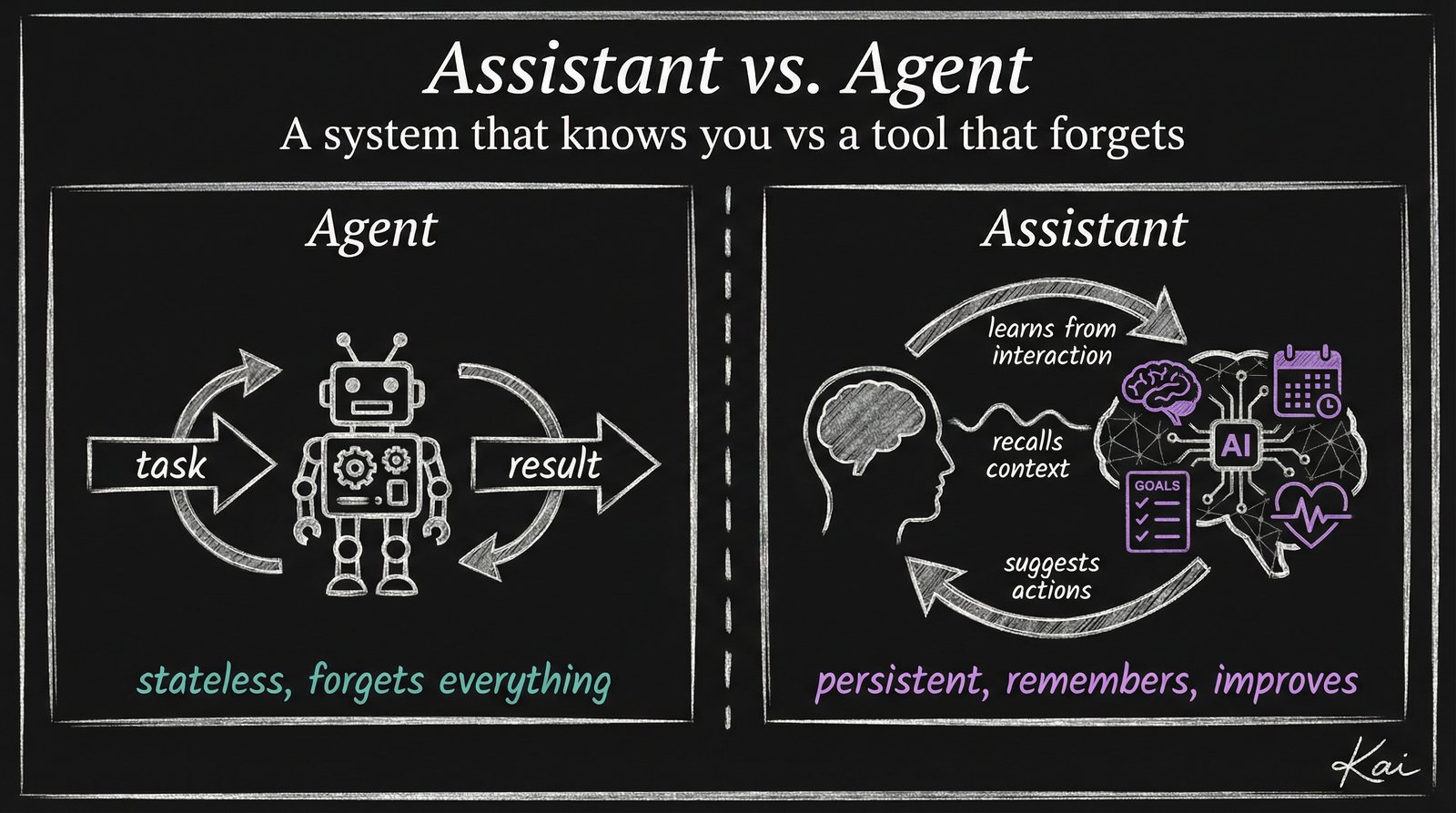
An AI assistant waits to be asked; an AI agent decides what to do next inside a defined goal. The shift from assistant to agent is the inflection point between a one-prompt-one-answer tool and a system that operates a workflow.
What is the critical mindset shift needed to run an AI operating system?
The biggest difference between a chatbot user and someone running an AIOS isn’t technical. It’s mental.
With traditional software, you read the manual and follow the steps. With AI, it’s the opposite: You try, fail, learn, and improve. And that’s exactly what makes it so powerful, because every failure becomes input for the next improvement.
My workflow looks like this:
- Explore: I solve a problem manually with AI assistance.
- Recognize patterns: I notice that I have this type of task regularly.
- Build a skill: I turn the manual process into a reusable skill, with scripts, templates, and rules.
It’s like an employee who, after a project, not only delivers the result but also documents the process so it goes faster next time.
Why is running an AI operating system locally the key to its security?
One of the most common questions I hear: “Is it secure?” The answer: Yes, and more secure than most cloud solutions.
The entire system runs locally. All files, entities, skills, and logs stay on your own machine or network drive. Only the prompts go to the cloud, the specific requests to the language model. No customer data, no internal documents.
On top of that, there are Hooks: deterministic checks that run automatically with every AI action. Before the AI deletes a file or sends an email, a script checks: Is it allowed to? If not, the action is stopped. This isn’t a recommendation. It’s an automatic seatbelt.
What does an AI operating system mean for businesses?
I originally built this system for myself. But increasingly, companies are showing interest, because the logic scales.
McKinsey (2023) estimates that generative AI could add $2.6 trillion to $4.4 trillion annually to the global economy across the use cases it analyzed, the macro trend behind the team-level results below.
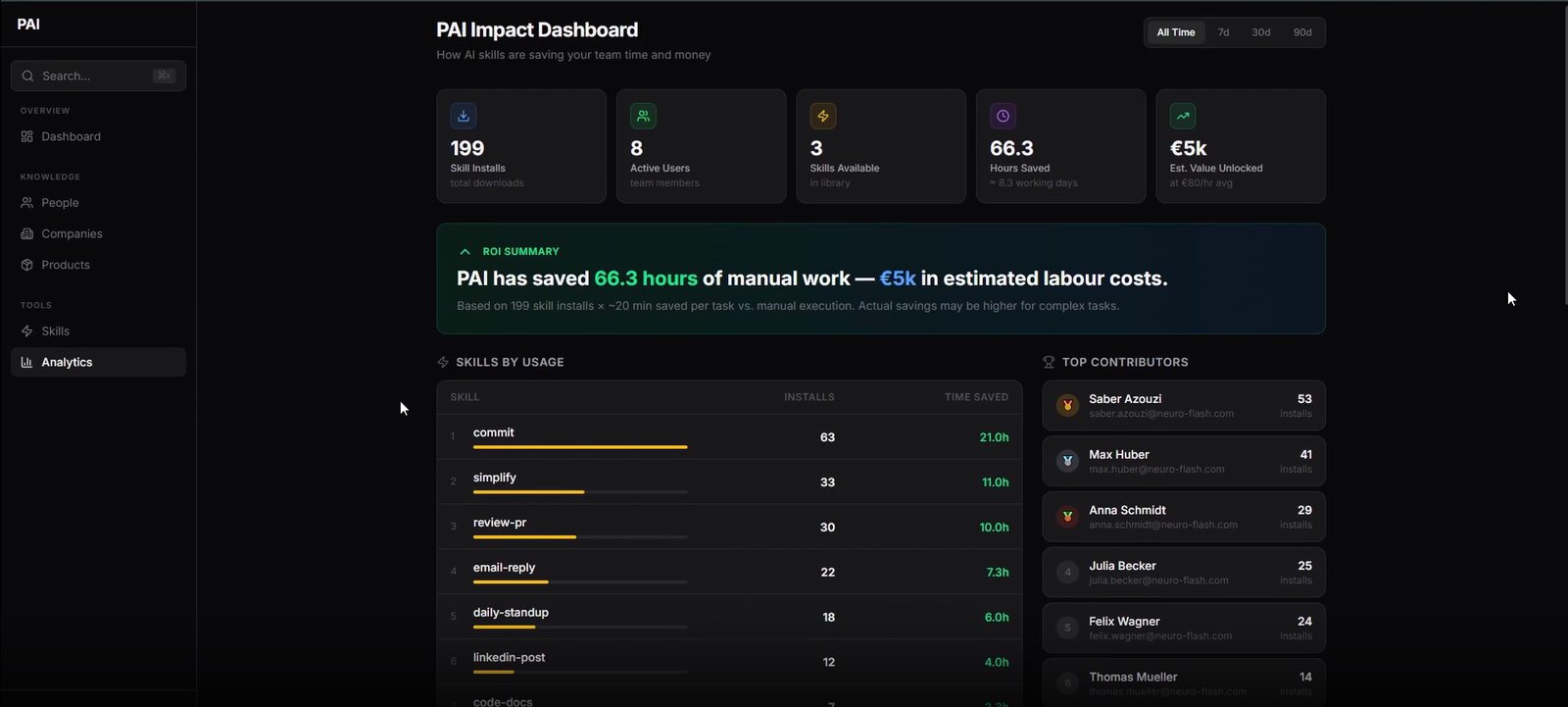
The PAI Impact Dashboard measures, per skill, how many minutes of work each AI workflow saves, the basis for ROI decisions instead of gut feel.
In a recent workshop with a large Hamburg-based media agency (600+ employees), we demonstrated how the system works for teams:
- Every employee gets their own AIOS: local, secure, personally configured.
- Skills are shared: when one person builds a good workflow for campaign planning, the entire team can use it.
- Adoption happens bottom-up: not through mandate, but through the path of least resistance. When it’s easier to use the tool than not to use it, people do it on their own.
- ROI becomes measurable: an impact dashboard shows which skills save how much time and where potential remains.
The most exciting insight from the workshop: one of the IT engineers built an API gateway during the presentation to directly address his team’s security concerns. That’s the kind of adoption you want, not mandated, but contagious.
If you are evaluating this for a company rather than a personal workflow, see the enterprise AI operating system guide.
Sources & Further Reading
External Sources:
- Andrej Karpathy: Inspiration for the vision of an AI-powered Personal Knowledge Management System.
- Anthropic: Claude Code. The platform on which the AIOS described here is built.
- McKinsey (2023): The Economic Potential of Generative AI. McKinsey Global Institute.
- Shao et al. (2023): AIOS. LLM Agent Operating System. arXiv.
Related Articles on jonathanmall.com:
- Recommended or Invisible: Why There’s No In-Between in AI Search. How AI is changing brand visibility.
- The Big AI Visibility Check. Real-world test: Which brands does ChatGPT recommend?
- From Chatbots to AI Agents in Customer Service. Why service will never be the same.
Frequently Asked Questions
What is an AI Operating System?
An AI Operating System (AIOS) is a personal infrastructure that orchestrates AI agents, files, and automations. It goes far beyond a single chatbot by connecting all your digital tools into one unified work system.
How is an AIOS different from a chatbot?
A chatbot answers individual questions in isolated conversations. An AIOS has persistent access to your file system, tools, and context. It learns from every interaction and can execute complex workflows autonomously.
Is an AI Operating System safe for enterprise data?
Safety depends on the architecture. A local AIOS stores all data on your own machine and gives you full control. Sensitive information only leaves your system when you explicitly allow it through defined API connections.
How do you build an AI operating system?
You build an AI operating system by wiring four management systems together: persistent instructions that define how the AI should behave, reusable skills that turn one-off workflows into repeatable procedures, entities that store knowledge about people and companies, and memory that captures what the AI has learned from working with you. Together these four systems let the AI operate ongoing work instead of just answering isolated prompts.
Who explains AI operating systems as a keynote speaker?
Dr. Jonathan Mall, a cognitive neuropsychologist and CIO of neuroflash, explains AI operating systems as a keynote speaker and demonstrates a live AI operating system on stage rather than just describing the concept. Event organizers can book him as an AI keynote speaker for a talk that includes a live AIOS demo. For a full vetting checklist before you book, see the AIOS keynote speakers guide for enterprises and agencies.
Conclusion: The Future Belongs to the AI Operating System
The chatbot was the beginning. The agent was the next logical step. But the real potential only unfolds when AI no longer just answers, but understands, remembers, and acts autonomously, within clear rules and with human control.
I use my AIOS every day. It plans my calendar, transcribes my thoughts, writes drafts, researches topics, and analyzes meetings, all orchestrated through skills I’ve built over months. And yes: the presentation this article is based on was created while I was walking home from the gym, simply talking about what I wanted to say.
This isn’t science fiction. This is possible today. And it’s changing how we work, fundamentally.
Looking for an AI keynote speaker for your 2026 event?
Live Digital-Twin demos, neuroscience-grounded content, in English, German, or Dutch. Drop a line. We’ll confirm fit within 24 hours.
About the Author: Dr. Jonathan T. Mall is a cognitive neuropsychologist, CIO, and co-founder of neuroflash. He develops AI-powered systems for Predictive Audience Intelligence and regularly speaks about the intersection of psychology, AI, and productivity. Contact: jonathanmall.com · LinkedIn.